> ## Documentation Index
> Fetch the complete documentation index at: https://koreai-ai-for-work-dev.mintlify.site/llms.txt
> Use this file to discover all available pages before exploring further.
# Agent Dashboard - Supervisor Evaluation
The Agent Dashboard provides supervisors with a consolidated view of an agent's performance across interactions, evaluations, audits, coaching activities, and customer experience metrics.
The Evaluation tab focuses on interaction-level performance analysis. It displays evaluated interactions for the selected agent, including Auto QA scores, manual audit scores, sentiment scores, bookmarks, and audit status. Supervisors can review individual interactions, identify coaching opportunities, and create coaching assignments directly from selected conversations.
The interaction list displays the most recent conversations first, enabling supervisors to review recent performance and quality trends.
## Access Evaluation Tab
Navigate to **Quality AI** > **AutoQA** > **Dashboard** > **Agent Leaderboard** > **Select an Agent** > **Evaluation** tab. Or,
**Quality AI** > **Coaching** > **Agent Leaderboard** > **Select an Agent** > **Evaluation** tab.
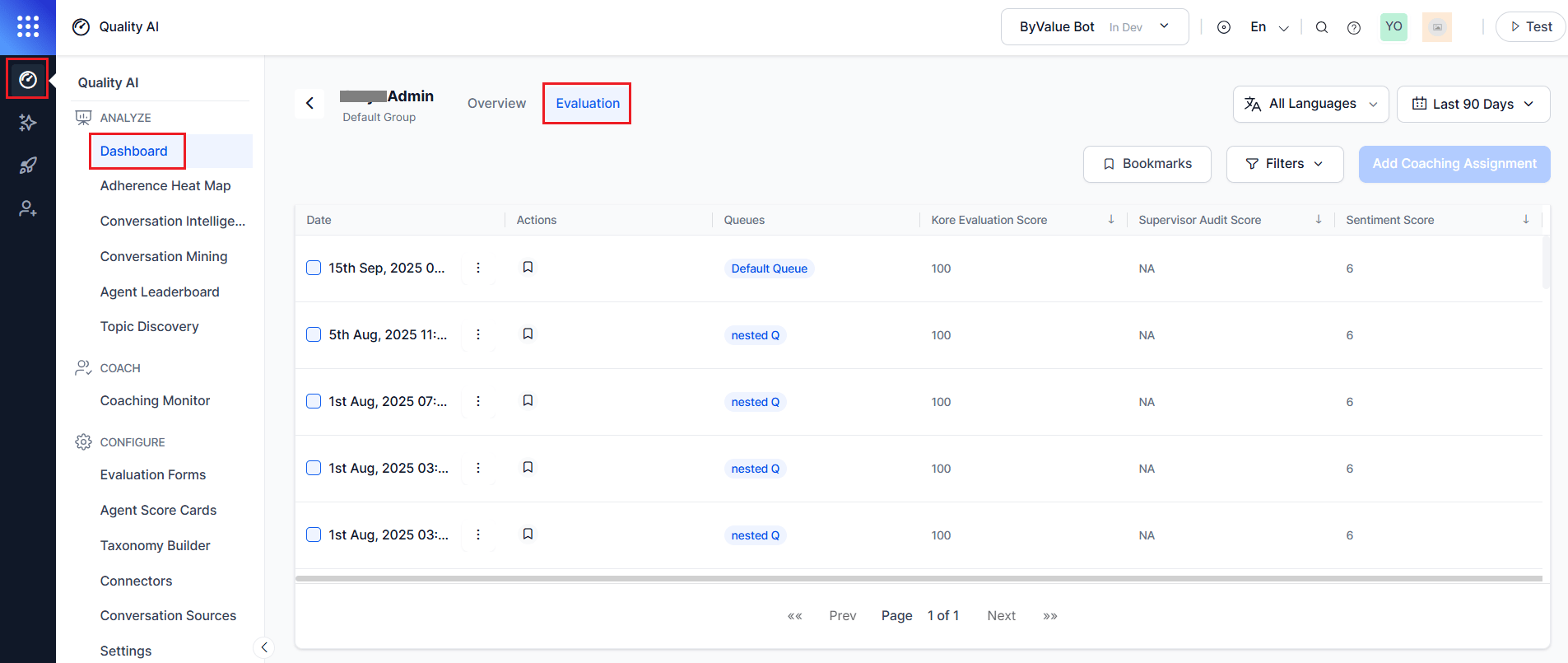 The **Evaluation** tab enables supervisors to:
* Review interaction-level evaluation results.
* Compare Auto QA and manual audit scores.
* View sentiment scores and audit status.
* Filter interactions by queue, channel, language, and contact direction.
* Bookmark interactions for future reference.
* Open interactions in the Audit screen for detailed review.
* Create coaching assignments from selected interactions.
***
## Key Capabilities
| Capability | Description |
| -------------------------------- | ------------------------------------------------------------------------------------ |
| **Interaction-Level Analysis** | Review Auto QA, audit, and sentiment scores for individual interactions. |
| **Audit Review** | Analyze audited and non-audited interactions. |
| **Direction-Aware Insights** | Compare inbound and outbound interaction performance. |
| **Bookmark-Based Coaching** | Use saved bookmarked interactions as coaching references and best-response examples. |
| **Coaching Assignment Creation** | Create coaching assignments directly from selected interactions. |
| **Audit Drill-Down** | Open interactions in the Audit screen for detailed evaluation and review. |
***
## Evaluation Tab Filters
Provides filters to help supervisors focus on specific interaction segments and performance areas.
| Filter | Description |
| -------------- | -------------------------------------------------------- |
| **Language** | Filter interactions by one or more configured languages. |
| **Date Range** | View interactions within a selected date range. |
| **Bookmarks** | Show only bookmarked interactions. |
All filters apply globally and dynamically update the interaction list.
***
## Evaluation Interaction List
Displays filtered interactions for the selected agent.
| Column | Description |
| -------------------------- | --------------------------------------------------------------------------------- |
| **Date Range Selection** | Helps you filter the interactions by selecting a date range. |
| **Actions (Bookmark)** | Bookmarks assigned to the interaction, which you can filter and use for coaching. |
| **Queues** | Displays filtered interactions by queue. |
| **Kore Evaluation Score** | Auto QA score generated from the evaluation form. |
| **Supervisor Audit Score** | Score assigned during manual audit review. Displays N/A if not audited. |
| **Sentiment Score** | Sentiment score generated for the interaction. |
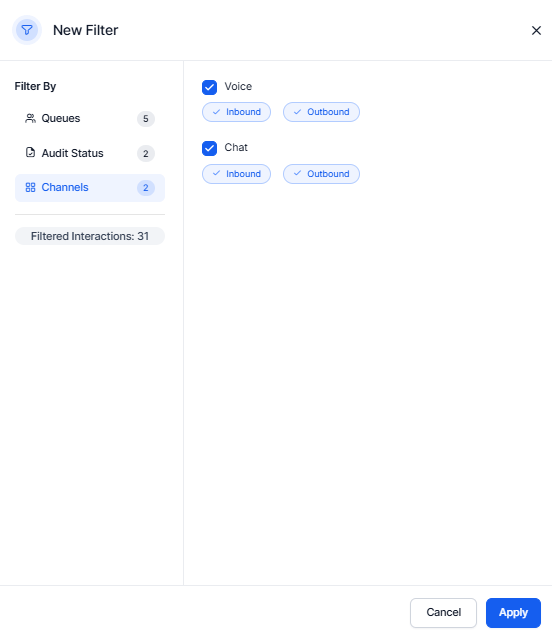
**Available filter categories:**
| Filter | Description |
| ----------------------- | ----------------------------------------------------------------------------------------- |
| **Audit Status** | Filters audited and unaudited interactions individually. |
| **Channels** | Filter by Voice or Chat, with additional selection for Inbound and Outbound interactions. |
| **Filter Interactions** | Displays the total number of filtered interactions. |
The **Evaluation** tab enables supervisors to:
* Review interaction-level evaluation results.
* Compare Auto QA and manual audit scores.
* View sentiment scores and audit status.
* Filter interactions by queue, channel, language, and contact direction.
* Bookmark interactions for future reference.
* Open interactions in the Audit screen for detailed review.
* Create coaching assignments from selected interactions.
***
## Key Capabilities
| Capability | Description |
| -------------------------------- | ------------------------------------------------------------------------------------ |
| **Interaction-Level Analysis** | Review Auto QA, audit, and sentiment scores for individual interactions. |
| **Audit Review** | Analyze audited and non-audited interactions. |
| **Direction-Aware Insights** | Compare inbound and outbound interaction performance. |
| **Bookmark-Based Coaching** | Use saved bookmarked interactions as coaching references and best-response examples. |
| **Coaching Assignment Creation** | Create coaching assignments directly from selected interactions. |
| **Audit Drill-Down** | Open interactions in the Audit screen for detailed evaluation and review. |
***
## Evaluation Tab Filters
Provides filters to help supervisors focus on specific interaction segments and performance areas.
| Filter | Description |
| -------------- | -------------------------------------------------------- |
| **Language** | Filter interactions by one or more configured languages. |
| **Date Range** | View interactions within a selected date range. |
| **Bookmarks** | Show only bookmarked interactions. |
All filters apply globally and dynamically update the interaction list.
***
## Evaluation Interaction List
Displays filtered interactions for the selected agent.
| Column | Description |
| -------------------------- | --------------------------------------------------------------------------------- |
| **Date Range Selection** | Helps you filter the interactions by selecting a date range. |
| **Actions (Bookmark)** | Bookmarks assigned to the interaction, which you can filter and use for coaching. |
| **Queues** | Displays filtered interactions by queue. |
| **Kore Evaluation Score** | Auto QA score generated from the evaluation form. |
| **Supervisor Audit Score** | Score assigned during manual audit review. Displays N/A if not audited. |
| **Sentiment Score** | Sentiment score generated for the interaction. |
**Available filter categories:**
| Filter | Description |
| ----------------------- | ----------------------------------------------------------------------------------------- |
| **Audit Status** | Filters audited and unaudited interactions individually. |
| **Channels** | Filter by Voice or Chat, with additional selection for Inbound and Outbound interactions. |
| **Filter Interactions** | Displays the total number of filtered interactions. |
 ***
## Coaching Workflow
The **Evaluation** tab supports creating individual coaching assignments using selected interactions.
## Create Coaching Assignment
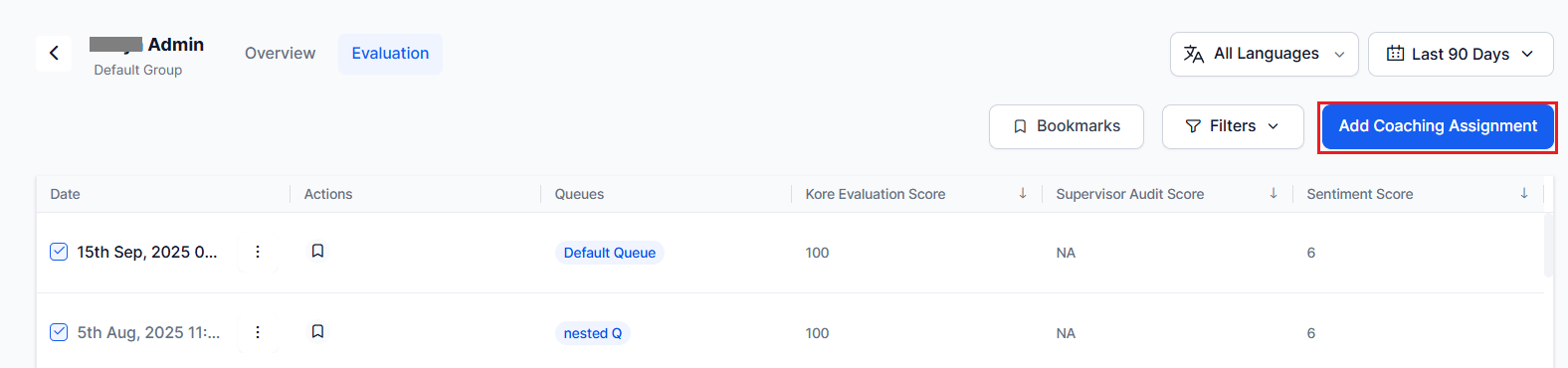
1. Select the **Evaluation** tab on the Agent Details page.
2. Select an interaction that require coaching.
3. Select the vertical ellipsis (⋮) and select **View**. The system opens the **Audit Review** workspace. The available actions depend on the interaction's audit status. For example:
* **Unassigned** interactions display Assign to me.
* **Assigned** interactions display audit progress and evaluation controls.
* **Audited**, **Resolved**, and other completed interactions open in review mode.
To view agent interactions, refer to [Audit Review](/ai-for-service/quality-ai/analyze/ai-assisted-manual-audit).
4. Select **Add Coaching Assignment**. The **New Coaching Assignment** dialog opens.
***
## Coaching Workflow
The **Evaluation** tab supports creating individual coaching assignments using selected interactions.
## Create Coaching Assignment
1. Select the **Evaluation** tab on the Agent Details page.
2. Select an interaction that require coaching.
3. Select the vertical ellipsis (⋮) and select **View**. The system opens the **Audit Review** workspace. The available actions depend on the interaction's audit status. For example:
* **Unassigned** interactions display Assign to me.
* **Assigned** interactions display audit progress and evaluation controls.
* **Audited**, **Resolved**, and other completed interactions open in review mode.
To view agent interactions, refer to [Audit Review](/ai-for-service/quality-ai/analyze/ai-assisted-manual-audit).
4. Select **Add Coaching Assignment**. The **New Coaching Assignment** dialog opens.
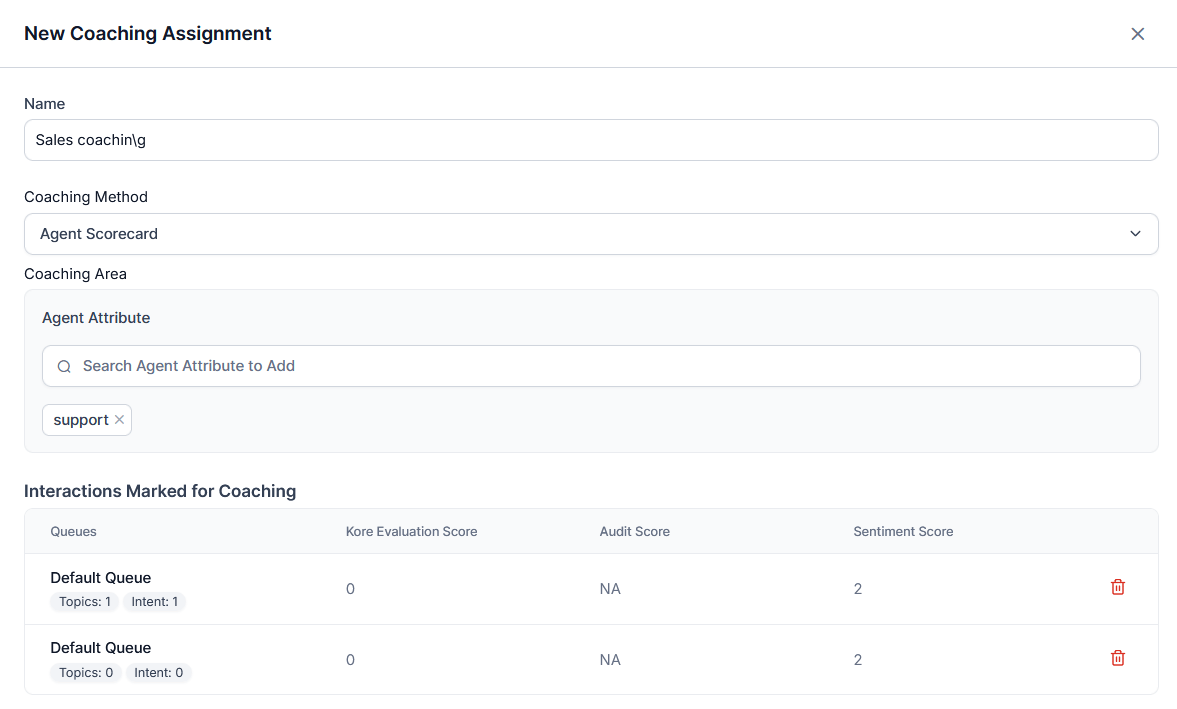
 5. Enter a **Name** for the coaching assignment.
6. Select a **Coaching Method**.
| Coaching Method | Description |
| ------------------- | ----------------------------------------------------------------------------------------- |
| **Agent Scorecard** | Creates the coaching assignment using predefined agent attributes. |
| **Evaluation Form** | Creates the coaching assignment using evaluation metrics from a selected evaluation form. |
7. Configure the **Coaching Area** based on the selected coaching method:
* **Agent Scorecard**: Select one or more Agent Attributes to define the coaching focus.
* **Evaluation Form**: Select an Evaluation Form, then search for and select one or more Evaluation Metrics to define the coaching focus.
The selected metrics define the coaching focus.
8. Review the **Interactions Marked for Coaching**.
The system automatically adds the interactions selected from the **Evaluation** tab.
| Column | Description |
| ------------------------- | -------------------------------------------------------------------------------------- |
| **Queues** | Displays the queue associated with the interaction. |
| **Kore Evaluation Score** | Displays the AI-generated evaluation score. |
| **Audit Score** | Displays the manual audit score. If no manual audit exists, the value displays **NA**. |
| **Sentiment Score** | Displays the conversation sentiment score. |
| **Delete** | Enables you to remove the interaction from the coaching assignment. |
5. Enter a **Name** for the coaching assignment.
6. Select a **Coaching Method**.
| Coaching Method | Description |
| ------------------- | ----------------------------------------------------------------------------------------- |
| **Agent Scorecard** | Creates the coaching assignment using predefined agent attributes. |
| **Evaluation Form** | Creates the coaching assignment using evaluation metrics from a selected evaluation form. |
7. Configure the **Coaching Area** based on the selected coaching method:
* **Agent Scorecard**: Select one or more Agent Attributes to define the coaching focus.
* **Evaluation Form**: Select an Evaluation Form, then search for and select one or more Evaluation Metrics to define the coaching focus.
The selected metrics define the coaching focus.
8. Review the **Interactions Marked for Coaching**.
The system automatically adds the interactions selected from the **Evaluation** tab.
| Column | Description |
| ------------------------- | -------------------------------------------------------------------------------------- |
| **Queues** | Displays the queue associated with the interaction. |
| **Kore Evaluation Score** | Displays the AI-generated evaluation score. |
| **Audit Score** | Displays the manual audit score. If no manual audit exists, the value displays **NA**. |
| **Sentiment Score** | Displays the conversation sentiment score. |
| **Delete** | Enables you to remove the interaction from the coaching assignment. |
 9. Under **Best Responses** (optional), add reference interactions from saved bookmarks.
1. Select relevant bookmarked interactions.
2. select **Add Interaction** to add them.
You can select more than one bookmark based on the evaluation criteria. For example, one set for the support queue and another for best responses.
9. Under **Best Responses** (optional), add reference interactions from saved bookmarks.
1. Select relevant bookmarked interactions.
2. select **Add Interaction** to add them.
You can select more than one bookmark based on the evaluation criteria. For example, one set for the support queue and another for best responses.
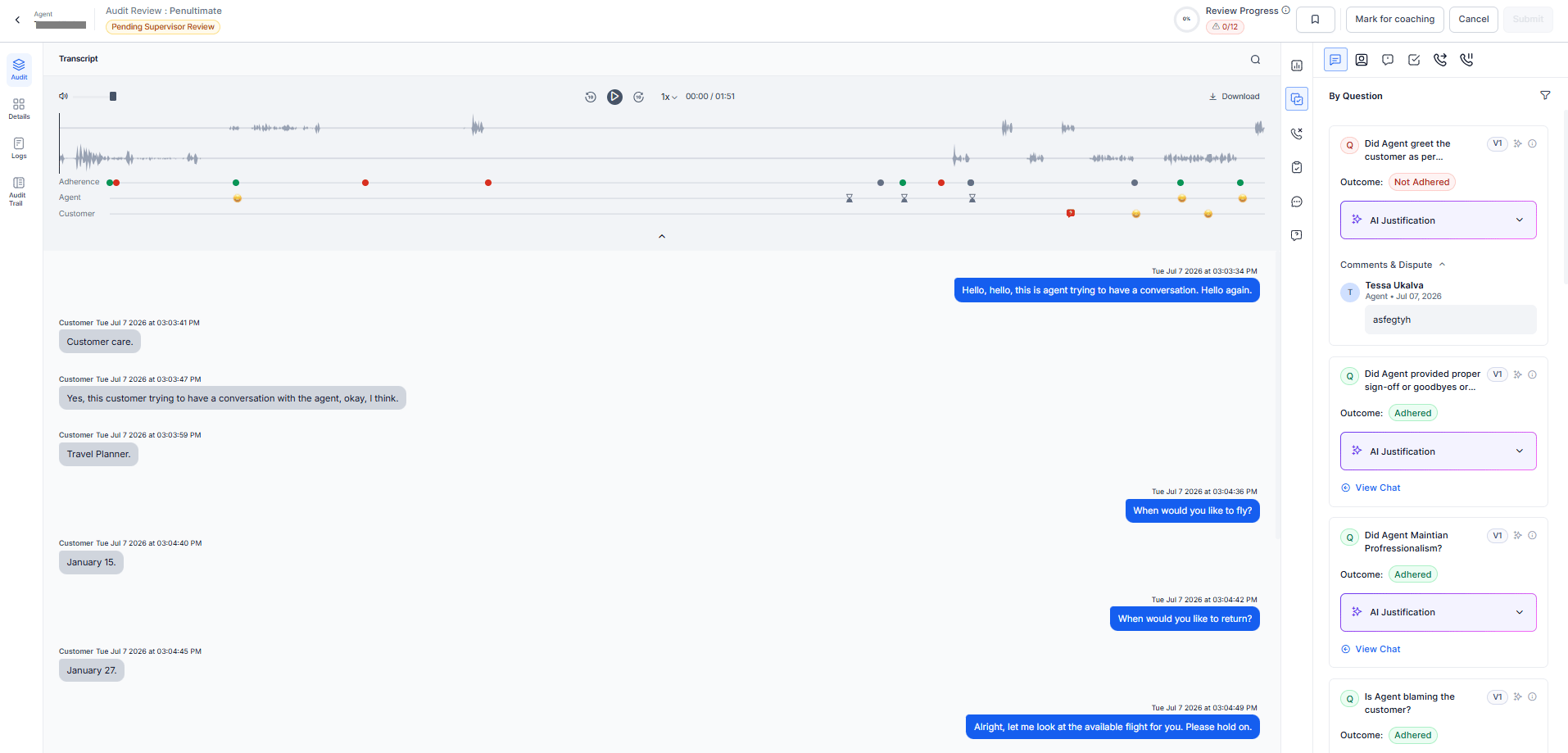
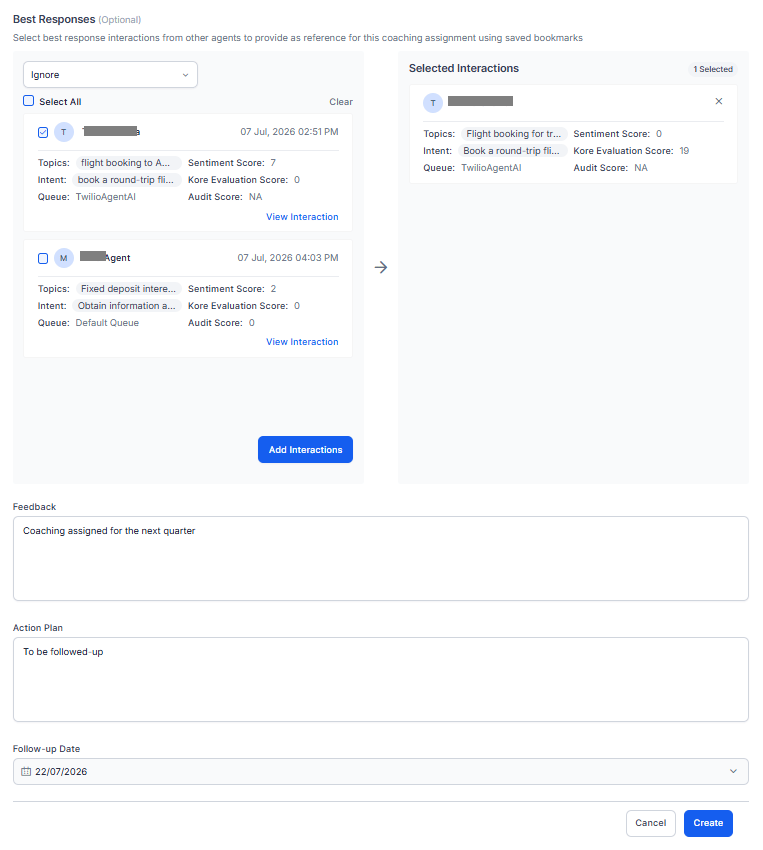 10. Select **View Interactions** (optional) to review an interaction in AI-Audit screen before adding them as a coaching reference.
 11. Enter your **Feedback** that summarizes strengths and improvement areas.
12. Define an **Action Plan** for the agent to improve.
13. Set the **Follow-up Date** for coaching review.
14. Select **Create**.
The system creates the coaching assignment and adds it to the agent's coaching assignments.
You can mark interactions for coaching directly from the **Audit Review** workspace. The system automatically adds those interactions to the **Interactions Marked for Coaching** section when you create a coaching assignment.
***
11. Enter your **Feedback** that summarizes strengths and improvement areas.
12. Define an **Action Plan** for the agent to improve.
13. Set the **Follow-up Date** for coaching review.
14. Select **Create**.
The system creates the coaching assignment and adds it to the agent's coaching assignments.
You can mark interactions for coaching directly from the **Audit Review** workspace. The system automatically adds those interactions to the **Interactions Marked for Coaching** section when you create a coaching assignment.
***