> ## Documentation Index
> Fetch the complete documentation index at: https://koreai-ai-for-work-dev.mintlify.site/llms.txt
> Use this file to discover all available pages before exploring further.
# Script Task Node
Use this node to write a JavaScript script that processes context variables or other flow variables.
!!! Notes
* Form data can't be manipulated using a script.
* The script node doesn't create a step in the flow automatically. Steps must be explicitly designed on the canvas.
## Configure the Node
### General Settings
In **General Settings**, configure the following:
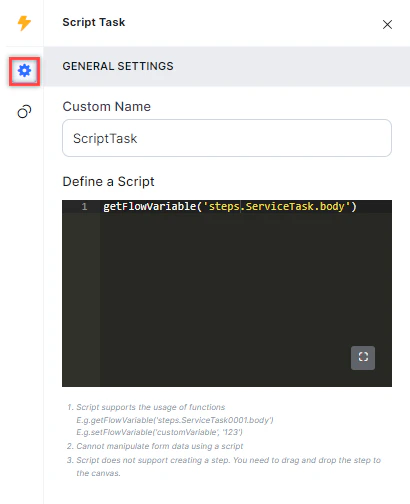 1. **Custom Name**: Enter a name to identify the node.
2. **Define a Script**: Use the JavaScript editor to write the script to run.
### Connection Rules
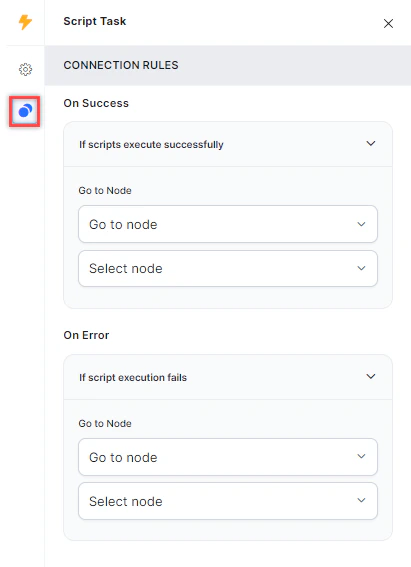
Click the **Connection Rules** icon and select the target node for each outcome:
* **On Success**: The flow routes to this node when the script runs successfully.
* **On Error**: The flow routes to this node when the script fails.
1. **Custom Name**: Enter a name to identify the node.
2. **Define a Script**: Use the JavaScript editor to write the script to run.
### Connection Rules
Click the **Connection Rules** icon and select the target node for each outcome:
* **On Success**: The flow routes to this node when the script runs successfully.
* **On Error**: The flow routes to this node when the script fails.