> ## Documentation Index
> Fetch the complete documentation index at: https://koreai-ai-for-work-dev.mintlify.site/llms.txt
> Use this file to discover all available pages before exploring further.
# IVR Digit Input Node
Use this node to collect numeric input from callers, such as a phone number or the last four digits of a credit card. You can configure input conditions, success routing, timeout handling, and error handling.
## Configure the Node
### General Settings
In **General Settings**, configure the following:
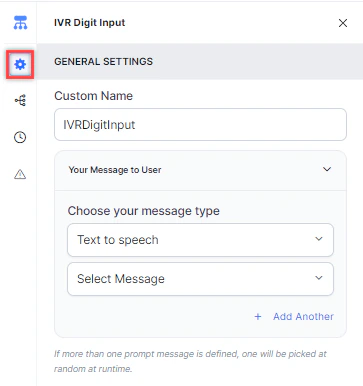 * **Custom Name**: Enter a name to identify the node.
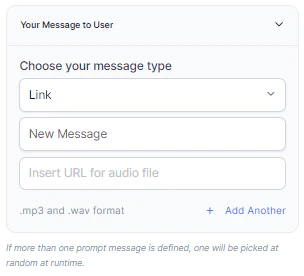
* **Your Message to User**: Select a message type under **Choose your message type**:
* **Text to Speech**: Type or select a message to convert to speech. Click **+ Create New** to add a new prompt, or **+ Add Another** to define multiple messages (one is randomly selected at runtime).
* **Custom Name**: Enter a name to identify the node.
* **Your Message to User**: Select a message type under **Choose your message type**:
* **Text to Speech**: Type or select a message to convert to speech. Click **+ Create New** to add a new prompt, or **+ Add Another** to define multiple messages (one is randomly selected at runtime).
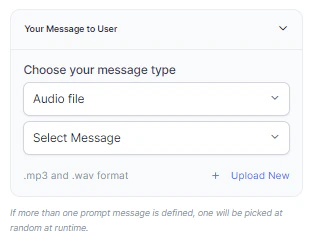
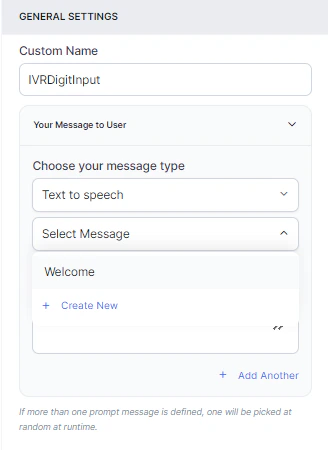 * **Audio File**: Type a message or click **+ Upload New** to upload an .mp3 or .wav file.
 * **Link**: Click **+ Create New** to add message text and an audio file URL (.mp3 or .wav). Click **+ Add Another** for additional URLs.
 ### Condition
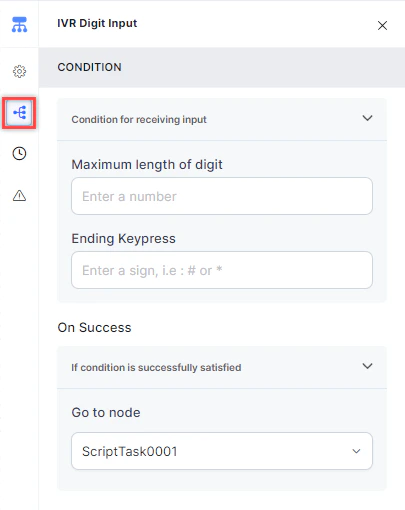
Click the **Condition** icon to define the criteria for accepting input:
* **Maximum length of digit**: Enter the maximum number of digits the caller can input.
* **Ending Keypress**: Enter the key that signals the end of input (for example, **#**).
* **On success**: Select a **Go to node** to route the flow when the condition is satisfied.
### Condition
Click the **Condition** icon to define the criteria for accepting input:
* **Maximum length of digit**: Enter the maximum number of digits the caller can input.
* **Ending Keypress**: Enter the key that signals the end of input (for example, **#**).
* **On success**: Select a **Go to node** to route the flow when the condition is satisfied.
 ### Timeout
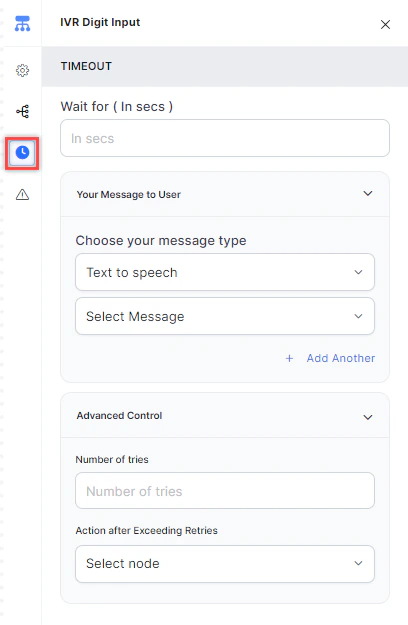
Configure the timeout flow with the following fields:
1. **Timeout**: Enter the wait time in seconds before a timeout event occurs.
* **Your Message to User**: Select a message type (Text to Speech, Link, or Audio) to play when a timeout occurs. See [General Settings](#general-settings) for details.
2. **Advanced Control**:
* **Number of Tries**: Enter the maximum number of retries allowed.
* **Action after Exceeding Retries**: Select the node to route to after retries are exhausted.
### Timeout
Configure the timeout flow with the following fields:
1. **Timeout**: Enter the wait time in seconds before a timeout event occurs.
* **Your Message to User**: Select a message type (Text to Speech, Link, or Audio) to play when a timeout occurs. See [General Settings](#general-settings) for details.
2. **Advanced Control**:
* **Number of Tries**: Enter the maximum number of retries allowed.
* **Action after Exceeding Retries**: Select the node to route to after retries are exhausted.
 ### Wrong Input
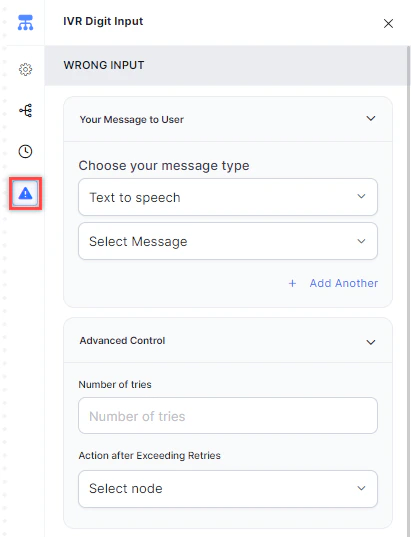
Use this tab to configure the flow when a caller provides incorrect digit input.
1. **Your Message to User**: Select a message type (Text to Speech, Link, or Audio) to play. See [General Settings](#general-settings) for details.
2. **Advanced Control** > **Number of Tries**: Enter the maximum number of retries for correct input.
3. **Advanced Control** > **Action after Exceeding Retries**: Select the node to route to after retries are exhausted.
### Wrong Input
Use this tab to configure the flow when a caller provides incorrect digit input.
1. **Your Message to User**: Select a message type (Text to Speech, Link, or Audio) to play. See [General Settings](#general-settings) for details.
2. **Advanced Control** > **Number of Tries**: Enter the maximum number of retries for correct input.
3. **Advanced Control** > **Action after Exceeding Retries**: Select the node to route to after retries are exhausted.
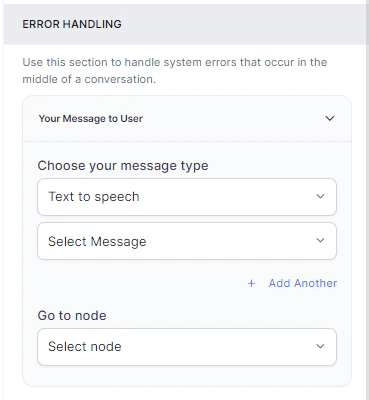
 ### Error Handling
Error handling is available under the **Wrong Input** tab. Use it to define how system errors are handled during a call.
* **Your Message to User**: Select a message type (Text to Speech, Link, or Audio) to play when a system error occurs. See [General Settings](#general-settings) for details.
* **Go to node**: Select the node for error handling. You can create a new node or select an existing one.
### Error Handling
Error handling is available under the **Wrong Input** tab. Use it to define how system errors are handled during a call.
* **Your Message to User**: Select a message type (Text to Speech, Link, or Audio) to play when a system error occurs. See [General Settings](#general-settings) for details.
* **Go to node**: Select the node for error handling. You can create a new node or select an existing one.
 ### Store Digit Input
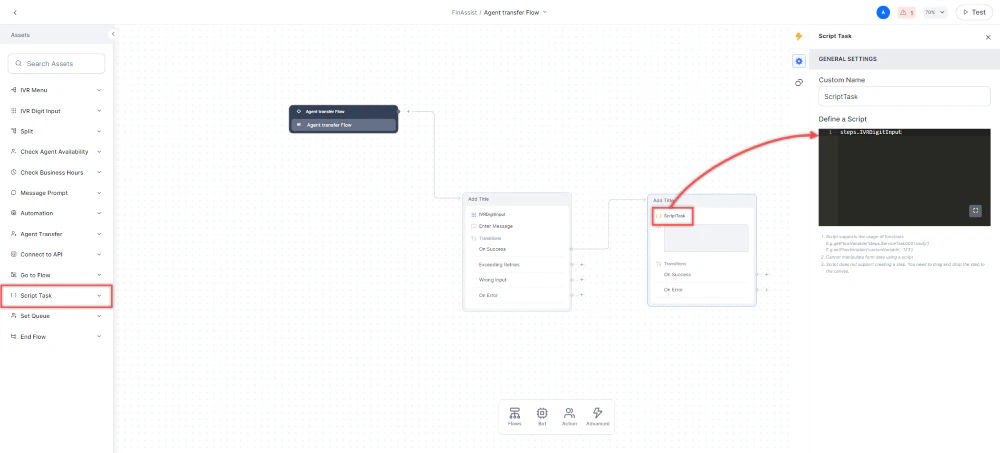
After the caller keys in their input, Contact Center AI stores it as a variable in a Script Task node. The context variable syntax is:
```
Context.steps.<< context_node_name >>
```
For example:
```
context.steps.IVRDigitInput
```
To store input from this node in a Script Task:
1. Add a **Script Task** node below the IVR Digit Input node.
2. In **General Settings** > **Define a Script**, add the step reference (for example, `steps.IVRDigitInput`).
### Store Digit Input
After the caller keys in their input, Contact Center AI stores it as a variable in a Script Task node. The context variable syntax is:
```
Context.steps.<< context_node_name >>
```
For example:
```
context.steps.IVRDigitInput
```
To store input from this node in a Script Task:
1. Add a **Script Task** node below the IVR Digit Input node.
2. In **General Settings** > **Define a Script**, add the step reference (for example, `steps.IVRDigitInput`).