> ## Documentation Index
> Fetch the complete documentation index at: https://koreai-ai-for-work-dev.mintlify.site/llms.txt
> Use this file to discover all available pages before exploring further.
# Feedback Settings
Feedback Settings let you configure how agents provide feedback on the Agent AI widget. Two feedback types are available:
| Type | Description |
| ----------------------------- | --------------------------------------------------------------------------------------------------------------------------------------------------------------------------------------------------------------------------------------------------- |
| **Context-Specific Feedback** | Configure up to six predefined negative feedback messages for Agentic Feedback, Dialog Tasks, Answers, FAQs, Summaries, and Landing Summary Feedback. Up to five can be active at a time. Messages appear after agents select the thumbs-down icon. |
| **Overall Widget Feedback** | Configure up to six positive and six negative feedback messages. Up to five from each category can be active at a time. Remains off by default. |
***
## Configure Feedback Messages
The Feedback Settings section includes subsections for Agentic Feedback, Dialog Task Feedback, Answers Feedback, FAQ Feedback, Summary Feedback, Overall Widget Feedback, and Landing Summary Feedback. Each subsection includes predefined messages that you can edit.
1. Sign in to Platform.
2. Go to **Agent AI** > **Configurations** > **Feedback Settings**.
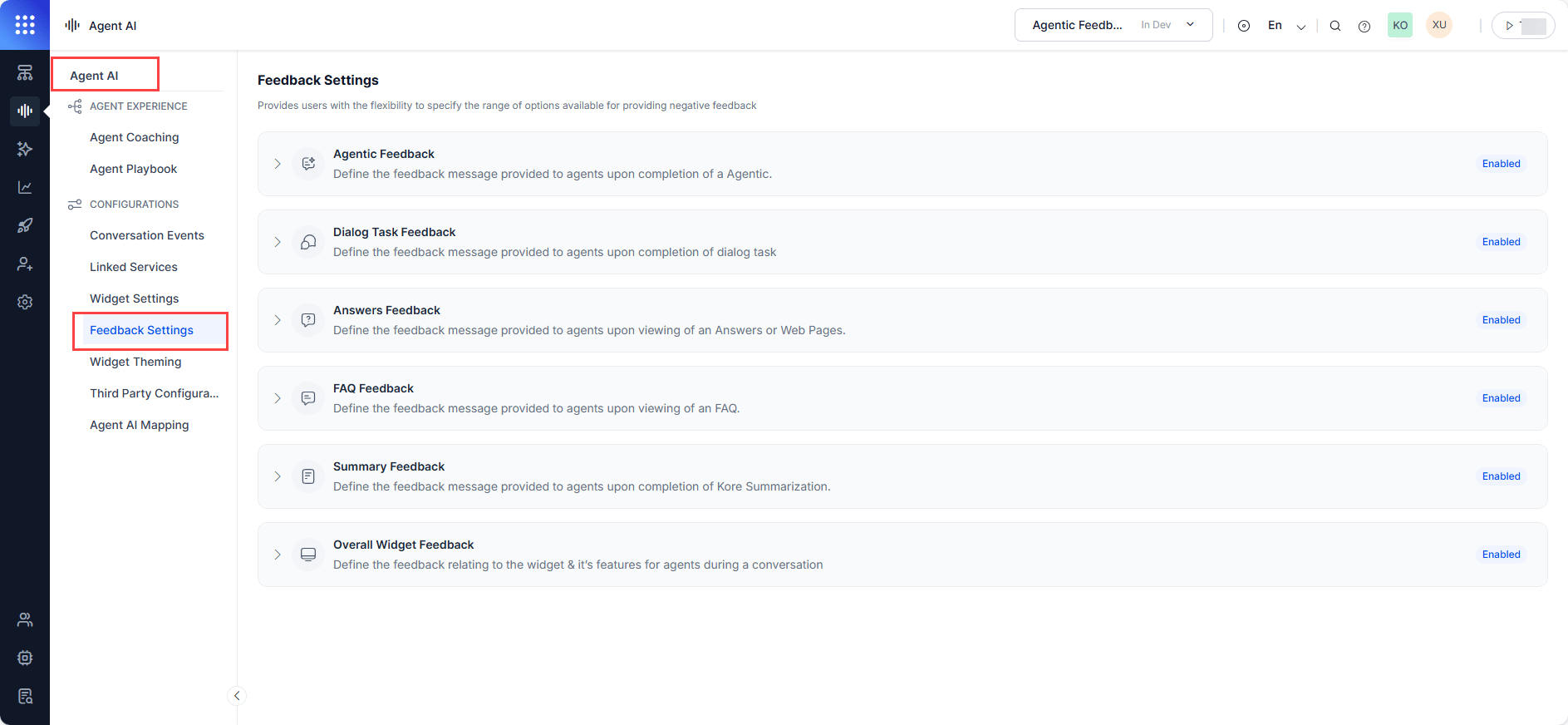 3. Expand any subsection — **Agentic Feedback**, **Dialog Task Feedback**, **Answers Feedback**, **FAQ Feedback**, **Summary Feedback**, **Overall Widget Feedback**, or **Landing Summary Feedback**.
4. Use the toggle to turn the subsection on or off.
* For **Overall Widget Feedback**, expand **Positive** or **Negative Feedback** separately.
3. Expand any subsection — **Agentic Feedback**, **Dialog Task Feedback**, **Answers Feedback**, **FAQ Feedback**, **Summary Feedback**, **Overall Widget Feedback**, or **Landing Summary Feedback**.
4. Use the toggle to turn the subsection on or off.
* For **Overall Widget Feedback**, expand **Positive** or **Negative Feedback** separately.
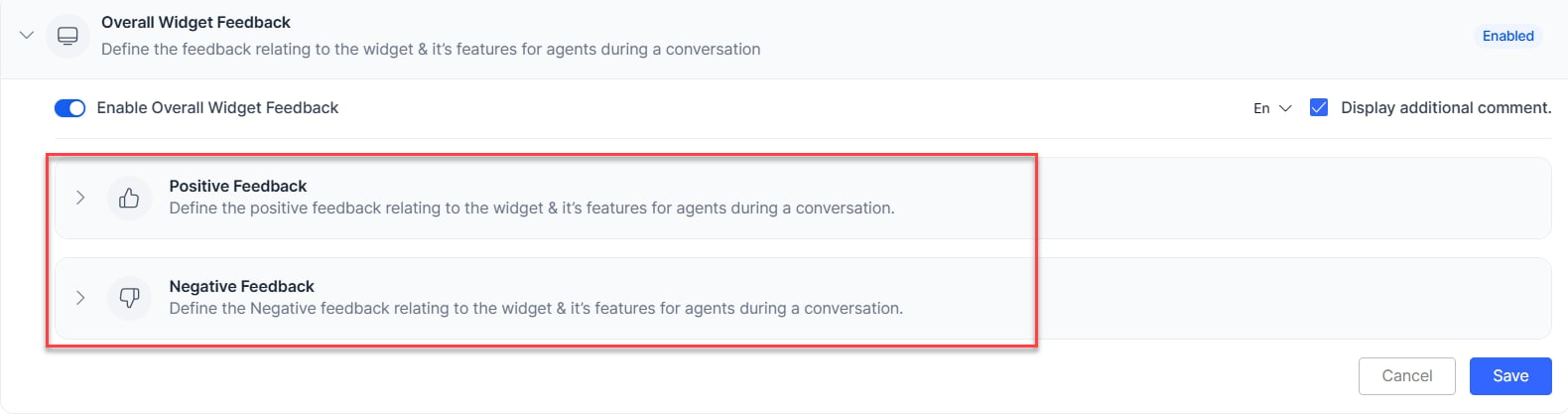 5. Select the edit icon on any feedback message.
6. Edit the message and press **Enter** to save.
***
## Turn On or Off Feedback Messages
Only active (turned on) feedback messages appear in the widget. Up to five of the six default messages can be active at a time.
1. Select the **Enable/Disable** toggle on a feedback message.
2. Select **Save**.
***
## Turn On or Off the Additional Comments Box
The **Display additional comment** box appears in the widget only if you turn it on here.
1. Select or clear the **Display additional comment** checkbox.
5. Select the edit icon on any feedback message.
6. Edit the message and press **Enter** to save.
***
## Turn On or Off Feedback Messages
Only active (turned on) feedback messages appear in the widget. Up to five of the six default messages can be active at a time.
1. Select the **Enable/Disable** toggle on a feedback message.
2. Select **Save**.
***
## Turn On or Off the Additional Comments Box
The **Display additional comment** box appears in the widget only if you turn it on here.
1. Select or clear the **Display additional comment** checkbox.
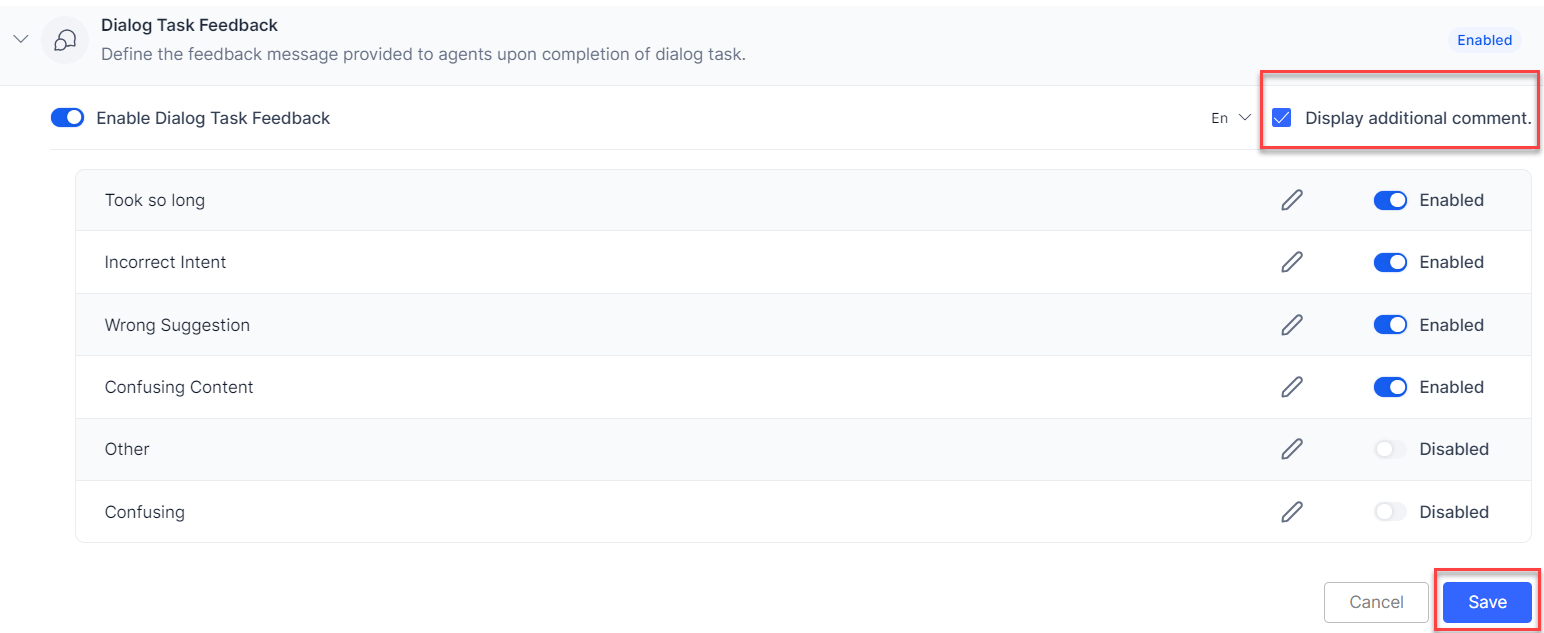 2. Select **Save**.
***
## Customize Feedback Language
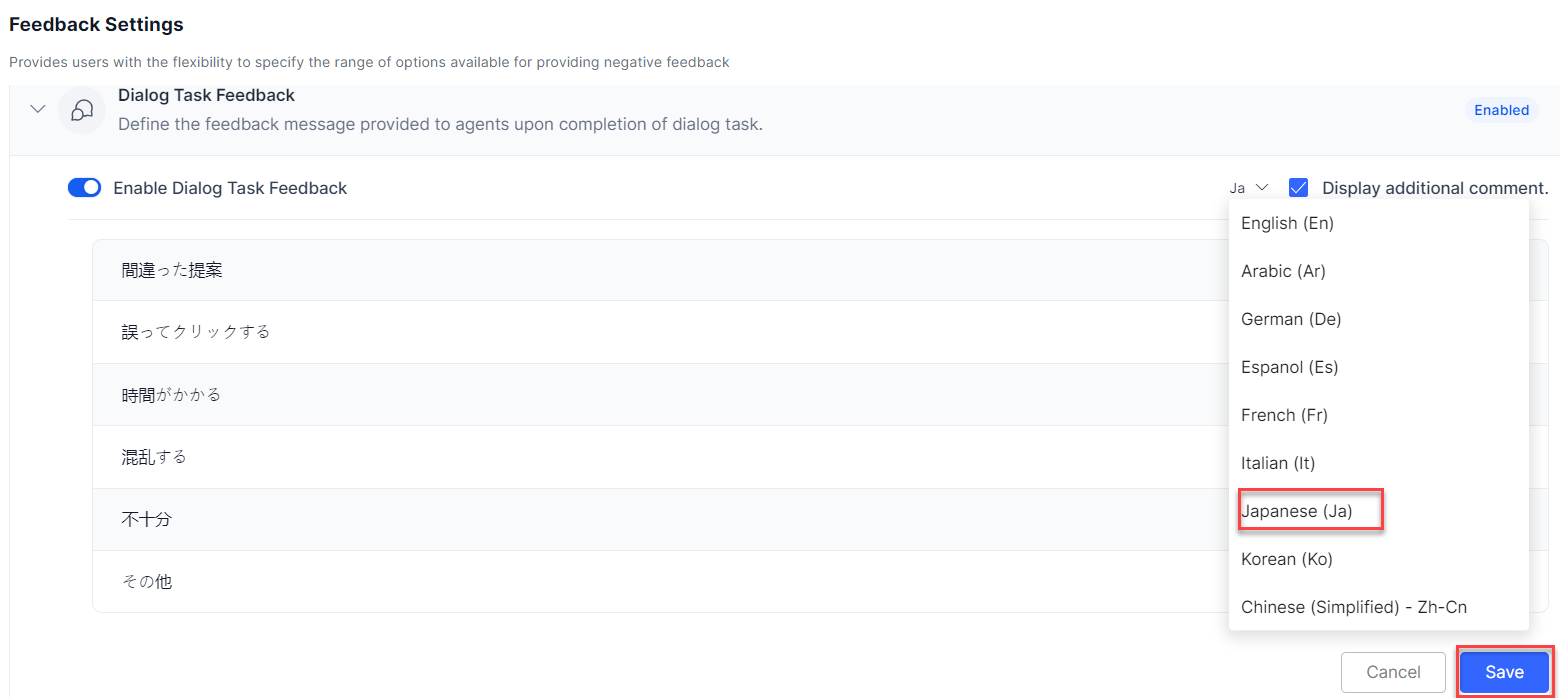
The system pre-selects the app's default language. You can change the display language for feedback messages.
1. Select the **language selection dropdown** list next to the **Display additional comment** box.
2. Select a language and select **Save**.
2. Select **Save**.
***
## Customize Feedback Language
The system pre-selects the app's default language. You can change the display language for feedback messages.
1. Select the **language selection dropdown** list next to the **Display additional comment** box.
2. Select a language and select **Save**.
 ***
## Feedback in the Agent AI Widget
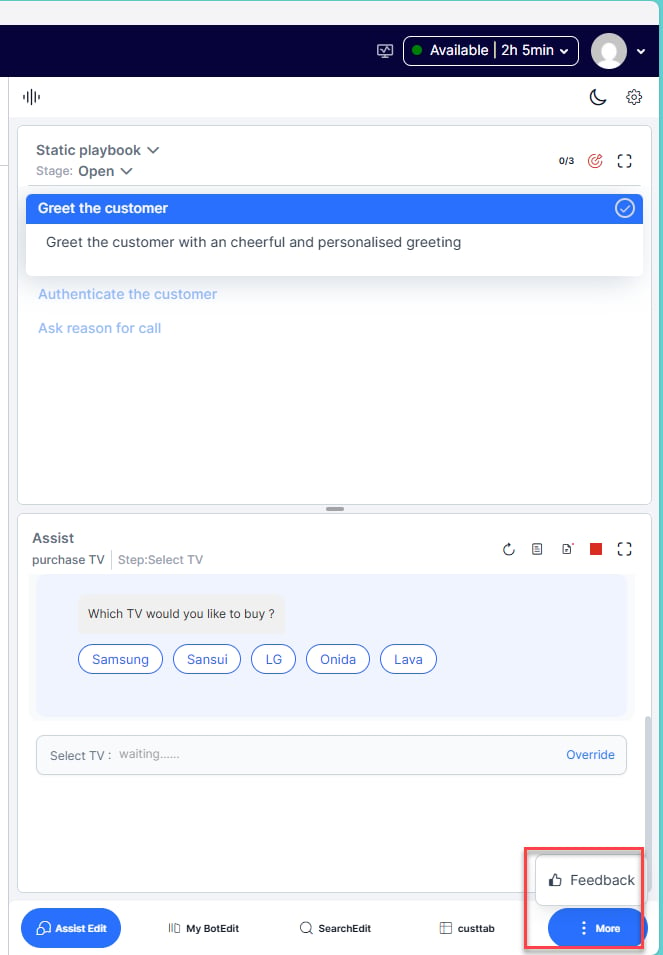
Feedback messages and the additional comment box appear in the widget only after you turn them on in **Feedback Settings**. If you don't configure them, only the thumbs-up and thumbs-down symbols appear.
| Feedback Type | Trigger |
| ---------------------------- | ---------------------------------------------------------------------------- |
| **Agentic Feedback** | When the system receives an Agentic Copilot Next Best Action suggestion. |
| **Dialog Task Feedback** | When a dialog task completes. |
| **Answers Feedback** | When an agent views an answer or web page. |
| **FAQ Feedback** | When an agent views an FAQ. |
| **Summary Feedback** | When an auto-generated summary appears. |
| **Overall Widget Feedback** | When the agent selects the ellipsis (more) icon at the widget's lower right. |
| **Landing Summary Feedback** | When an agent views the landing summary on agent transfer. |
***
## Feedback in the Agent AI Widget
Feedback messages and the additional comment box appear in the widget only after you turn them on in **Feedback Settings**. If you don't configure them, only the thumbs-up and thumbs-down symbols appear.
| Feedback Type | Trigger |
| ---------------------------- | ---------------------------------------------------------------------------- |
| **Agentic Feedback** | When the system receives an Agentic Copilot Next Best Action suggestion. |
| **Dialog Task Feedback** | When a dialog task completes. |
| **Answers Feedback** | When an agent views an answer or web page. |
| **FAQ Feedback** | When an agent views an FAQ. |
| **Summary Feedback** | When an auto-generated summary appears. |
| **Overall Widget Feedback** | When the agent selects the ellipsis (more) icon at the widget's lower right. |
| **Landing Summary Feedback** | When an agent views the landing summary on agent transfer. |
 Agents can select multiple feedback messages and enter additional comments in the **Tell us more…** field (if you have turned on **Display additional comment box**).
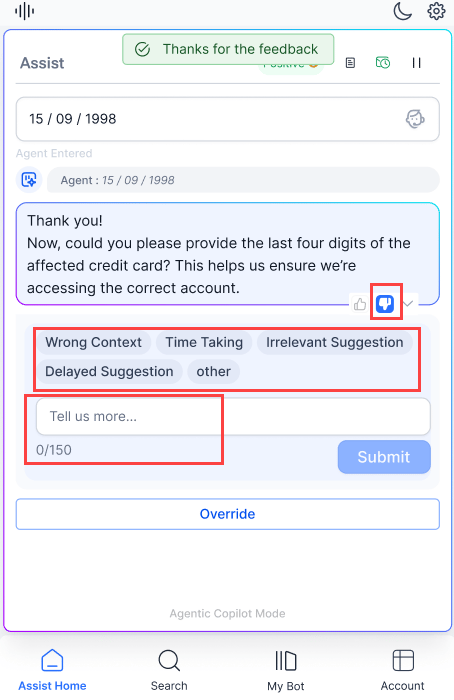 The **Submit** button appears only when at least one feedback message or the additional comment box is active in the widget.
***
The **Submit** button appears only when at least one feedback message or the additional comment box is active in the widget.
***